Download – WarmMag v1.4 – Premium Responsive Blogger Template

Warm Mag Is a My New Blogger Template. Its High User Friendly Blogger Template. If You Blogger User This is a best Template For You, Mobile, Desktop And Tablet Friendly User Interface. Simple And Clean Color’s, Navigation Menu, Image Slider and Tabs Wight Ready Template
Please do not forget to rate Warm Mag Blogger Template :)

Warm Mag Blogger Template Features

  • Responsive Template Design
  • Auto Blog Post summarize And “Read More” Button
  • Auto Image Crop With Thumbnail (Home Page and Label Page Only)
  • Css And HTML Base Menu With Drop down
  • Auto Date Show At Header Right side
  • Tabs Widgets ready (Powered By Jquery)
  • Image Slider (Powered By Jquery)
  • Simple User Friendly Search Box
  • Auto Pagination Added To Post Footer
  • Social Share Widget (Placed Post Footer)
  • Custom Error 404 Page With Search Box (Official 404 Page)
  • Related Post Widget (Placed Post Footer)
  • Ads Banner Ready
  • Meta Keywords And Description Support (Official Meta Description Support)
  • Random Post Selector
  • Recent Post By Label
  • 4 Column Footer Area
  • Flicker Image Gallery
  • Official “FOLLOW BY EMAIL” Widget

Download – Modern Blogger Theme – Studiopress

Download - Modern Blogger Theme - Studiopress
Go ahead, stand out from the crowd and let your originality move you to the front of the line.
The bold, sleek styling and colorful, contemporary design of the Modern Blogger theme makes remarkable blogging in a crowded world a snap.
6 LAYOUT OPTIONS.
CUSTOM BACKGROUND .
CUSTOM HEADER .
FEATURED IMAGES .
FIXED WIDTH .
HTML5 MARKUP .
THEME OPTIONS .
THREADED COMMENTS.

Doc: http://prettydarncute.com/modern-blogger-pro-setup/


modernblogger.zip - 186 KB

phpDolphin v1.2.7 – Social Network Platform – CodeCanyon


phpDolphin is a Social Network Platform similar with Facebook, allowing users to interact with each other by live chatting, sending messages, comments, like, share photos, life events and so much more.
Quick Video Demo: Video Demo
User Demo: User Demo (some features might be disabled) – Profile Example: Profile 1 | Profile 2
Admin Demo: Admin Panel

Features

User Features:


  • Live Chat, Messages & Comments.

  • News Feed (Friends Activity): displays messages posted by friends, online friends, friends suggestions and more.

  • Timeline (Personal Feed): displays all the messages posted by the author (personal feed), online friends and more.

  • Profile (Public Timeline): Displays your public profile along with Events, Archieve, Places and more.

  • Messages (Chat): Displays your friends based on their last activity, showing both online and offline friends.

  • Photos: upload up to 9 images at a time, displayed as gallery (facebook like).

  • Events: Photos, Videos, Maps (Google Maps), Custom Locations, Movies, Songs, Games, Meals.

  • Likes for messages with latest avatars preview and total likes counter.

  • Share messages from other users on your timeline.

  • #hashtag in messages, comments and chat conversations.

  • Trending Topics: Top 5 trending topics on Feed/Timeline page and Top 10 Trending Topics on #hashtag search page.

  • Notifications Center: Get notifications (red notification with counter) from your friends when they: Like, Share, Comment, Chat and New Friends.

  • Block: Users can block other users preventing them from chatting with each other.

  • Profile Privacy: Public (everyone can see the profile), Semi-Private (only friends can see the page), Private only you can see the profile.

  • Sound Notifications for New Notifications & Messages (triggers only when the page is not focused).

  • Message Privacy: Public (available for public and semi-private profiles), Private (available only to the author).

  • Online Privacy: Appear Online (when available) or Always Offline.

  • Report: Messages and Comments.

  • E-mail Notifications: when someone post a comment on your message or like it.

  • Notifications when new messages are posted on Feed, Subscriptions and Profile pages.

  • Emoticons (smiles) in Messages, Comments and Chat.

  • Verified Profiles.

  • Password recovery.

  • Unified Search Box: Live search for #hashtags and users (by Usernames, Names and Emails) with filter for Males of Females genres.

  • Covers and avatars for user profiles

  • Retina Display Ready Responsive Design (optimized for iPhone 5 and other iOS devices)

  • Filters Messages: Events (Pictures, Music, Videos, etc) and Archives (by Months [Timeline]).

  • Filters Notifications: Messages, Comments, Likes, Chat conversations.

  • Ajaxed pagination sitewide.

  • Friends suggestions (for new users).

  • Add Social Profiles for: Facebook, Twitter and Google+.

  • Turn On/Off visual notifications for Likes, Comments, Shares, Friendships, and Chat conversations.

  • Turn On/Off e-mail notifications for Likes and Comments and New Friends.

  • Log-in: Users can use both usernames and emails to log-in into their accounts.

  • YouTube, Vimeo, SoundCloud (with playlist for profiles) players integration into messages.

  • and more…

    Script/Admin Features:

  • Manage Users View, Edt, Verify, Delete Registerd Users.

  • Manage Reports View the reported messages/comments, mark them as safe or delete them.

  • Themes System (No PHP required and easy to understand system) – Activate or Deactivate themes.

  • Multi-Language System multi language platform with one file translation.

  • Modify the Time-Stamps format (4 types).

  • Turn On/Off mail notifications for registration, e-mail notifications for comments and likes (overrides user’s settings).

  • Change messages, comments, chat conversations per page.

  • Change the character limit per Post Message and Chat Message

  • Change the time interval for Notifications Center and Messages when to check for new notifications.

  • Change the time interval for Chat Conversations how often checks for new chat conversations.

  • Advanced statistics about User Registrations, Messages, Comments, Reported Messages & Comments, Likes.

  • Cache system for all images uploaded, that includes profile avatars, covers, and uploaded photos in messages.

  • Set the max. allowed image size for user’s profile.

  • Image file format allowed on user’s profile.

  • Set the max. allowed image size for upload in messages.

  • Image file format allowed in messages.

  • Option to censor words.

  • Manage reported messages (tweets).

  • 6 Ad units for specific places.

  • API to retrieve User Profile Details or latest 20 Messages of a User.

  • and so much more (see screenshots).

    PHP Scripts - PHP Social Microblogging | CodeCanyon

    PHP Social Microblogging Twitter is a script style, designed to share news, events, or simply what you want, through publications of 140 characters, and may refer to other users, create Hashtag and share with other site users. a part of it can upload images, videos from Youtube or Vimeo. Follow other users, send direct messages and other features that will be described below.
    Video Demo(Main features) V1.1: See video on Youtube
    (Features are disabled) User Demo: JohnDoe User Pass 12345

    (Features are disabled) Admin Demo: Admin User Pass 12345 link Admin Demo

    Features: 

    Users/General:


  • Send message direct/private


  • Customizable profile page.


  • Follow/Unfollow users


  • System favorites


  • Trending worldwide


  • #Hashtag


  • Design like twitter


  • Real-time updates on Page index


  • Real-time updates on Discover Page


  • Real-time updates on Search Page


  • Find people


  • Comments on posts


  • Page Status like twitter


  • List of Trends worldwide


  • Suggestions for who to follow


  • Block/Unblock users


  • Private profile


  • Option Delete Account


  • Users can change your user name as often as you wish


  • Upload cover


  • Upload Background


  • Upload avatar


  • Set the Color Link


  • Set the Color/Position Background


  • Upload Video from Youtube (API)


  • Upload Video from Vimeo(API)


  • User validation by email


  • Recovery password


  • An email, by account


  • Users verified twitter style


  • Only you can send private messages to your followers, twitter style


  • You can tell if a user is following you “FOLLOWS YOU”


  • Report users/publications


  • Change password


  • Discover page: where is the publication of the users who are not following


  • Delete Posts


  • You can login with your username or email

  • Admin Features:


  • Set Site Name


  • Set Keywords(SEO)


  • Set Description(SEO)


  • Set Message/Post length


  • Edit pages static e.g: Privacy, Help


  • Manage Users


  • Delete/Suspended Users


  • Change type account of users


  • Manage Users reported


  • Manage Posts reported


  • Manage Ads


  • Change password

  • Requirements:


  • cURL


  • PDO Driver


  • GD Library


  • Enabled function mbstring


  • This script was developed with PHP OOP and MVC
    Important: All images used in this demo are solely and exclusively from their owners, not be included in the script.

    Configurations

    See video on Youtube See Video on Youtube

    BootMagz - Magazine Theme

    BootMagz - Magazine Theme

    BooMagz is a premium magazine HTML template created for publishers, mass media, comunity and others.
    Features:
    1. Magazine style splash page with slide show images
    2. Categories / Archives articles page with featured article
    3. Single / detail article
    4. Blog
    5. Galleries with light box
    6. Static page (About)
    7. Contact form
    8. Widgets (popular, comments, tags, Facebook like box, latest photos, categories, archives)
    9. Uses JQuery 1.7.2

    PutihBiru Blogger template

    Demo | Download
     

    PutihBiru Blogger template

    Quintel is a free blogger template adapted from WordPress with 2 columns, right sidebar, fresh look, social bookmarking icons, posts thumbnails and simple look.
    MORE / INFO DEMO
     

    Collective Blogger Template

    Demo     Download
    Template name : Collective

    Template features : Wordpress Look, 3 Columns, Right Sidebar, 3 Columns Footer, Magazine, Clean Design, Featured Content Slider, Fixed Width, Gray Background, Top Navigation Menu, Email Subscription Form.

    Release date : July 2012

    Author :  www.soratemplates.com

    Designer :  stoodeo

    Basic Instructions : How to install a Blogger Template

    Configure Featured Content Slider:
    Login to blogger dashboard --> layout --> Edit HTML. Now scroll down to where you see the codes below:
    • <div id='slideshow'>
      <div class='slide'>
       <div class='post-img-large fl'>
       <a href='#'><img class='attachment-large' height='200' src='/image.jpg' width='570'/></a></div>
       <h2 class='post-title fl'>
      <a href='#'>Creative Digital Illustration</a></h2>
       <div class='clear'/>
      </div> 
       ..........
       <div class='tabs'>
       <a><img class='attachment-tiny' height='32' src='/thumb.jpg' width='82'/>
      <span>Creative Digital Illustration</span></a>
       ..........
    Now replace:
    • "#"with your featured post URL.
    • "image.jpg" with your slider image.
    • "thumbnail.jpg" with your thumbnail image.

    Configure Dropdown Menu:
    Login to blogger dashboard --> layout --> Edit HTML. Now scroll down to where you see the codes below:
    • <ul class='menu' id='menu-main-menu'>
       <li><a href='#'>Category One<span>Category Description</span></a></li>
       <li><a href='#'>Category Two<span>Category Description</span></a>
        <ul class='sub-menu'>
         <li><a href='#'>Sub Category One</a></li>
       ..........
    Just replace "#" with your menu item URL.

    How to change Recent Posts and Recent Comments Widget:
    Look for:
    • var rcp_numposts = 3; // Number of Posts will display
       ..........
      nc=3; // Number of comments will display

    Rocket Blogger Template


    Template name : Rocket - Responsive version
    Platform: Blogger / Blogspot
    Release date : November 2013
    Author :  www.soratemplates.com
    Designer :  kopasoft
    Template features : 3 Columns, Magazine, Responsive, Featured Content Slider, Fixed Width, Dropdown Menu, Social Widget, Gray Background, Page Navigation Widget.


    License : Creative Commons Attribution 3.0
    Basic Instructions : How to install a Blogger Template
    Configure Featured Content Slider:
    Login to blogger dashboard --> layout --> Edit HTML. Now scroll down to where you see the codes below:
    • <div class='flexslider' id='home-slider'>
       <ul class='slides'>
       <li>
       <article>
       <div class='kp-view'>
       <img src='../slide-1.jpg'/>
       <a class='kp-mask' href='#'/>
       </div> 
       <div class='flex-caption'>
       <h1><a href='#'>Eight Important Factors of ...</a></h1>
       </div> 
       </article>
       </li>
       ..........
    Replace:
    • "#" with your featured post URL.
    • "slide-1.jpg" with your slider image.

    Configure Dropdown Menu:
    Login to blogger dashboard --> layout --> Edit HTML. Now scroll down to where you see the codes below:
    • <ul id='main-menu'>
       <li class='current-menu-item'><a href='#'>Home</a></li>
       <li><a href='#'>Features</a>
        <ul>
         <li><a href='#'>Categories page</a></li>
         <li><a href='#'>Single page</a></li>
       ..........
    Replace "#" with your menu item URL.

    Configure Page Navigation Widget:
    search for:
    • var posts=6, // Number of posts in each page
          num=2, // Number of buttons will display

    OurBiz free wordpress theme


    Downloading the OurBiz Theme   |   Click here if your download does not start automatically.

    OurBiz


    A simple and impressive theme, OurBiz comes with designated ad spaces, widget areas, and many more customisations. OurBiz is an amazing Business/Portfolio theme.
    • Easy to use theme options page
    • New! Responsive Design (mobile friendly)
    • New! Shortcodes + Shortcode Generator in the editor
    • New! WooCommerce Shopping Cart Support
    • New! 4+ Custom Page Templates
    • Featured Image Ready
    • 125x125 banners ready (easy editable from admin options)
    • Compatible with latest WordPress versions
    • Widgets Ready + Custom Widgets
    • SEO Optimizedy
    • Tested and compatible with all major browsers: Chrome, Firefox, IE, Safari

    Features

    Custom Widgets

     Get some exclusive widgets that allow you to display adverts, link to your social networks and display site content in the sidebar.

    Contacts Page Template

     The built-in contact form makes it easy for users to communicate with you. Just enter your email address and it's ready.

    SEO Optimized

    Get an advantage over the competition on search engines with a Search Engine Optimized theme.

    Responsive Design

    A growing number of users are browsing the web on mobiles and tablets. Your theme comes with a built-in mobile friendly version.

    Cleand Code

    Uncompressed and organized code makes the theme easy to edit. Your theme follows WordPress' best practices.

    Page Templates

    A selection of page template are available with your theme. This gives you the option to have sitemaps, contact forms and pages without sidebars.

    Localization Ready

    Translate the theme with the included .po file. I18n has never been so easy.

    Theme Options

    Customise your theme with our comprehensive theme options. Everything is organised into tabs to make it easy to use.

    WooCommerce Ready

    Start selling online quicker with WooCommerce. There's no need to install or edit your theme to display your products online.

    WordPress Compatibility

    Every theme is updated and compatible with the latest WordPress version. We don't use any deprecated functions.

    Shortcodes

    We've added extra options to your post editing page to make it easier to display tables, tabs, buttons and more without learning code.

    Featured Posts Slider

    Capture your user's attention with a customizable and interactive slideshow. You'll find loads of ways to edit it in the theme options.

    Free$0

    •   Use in your unlimited domains
      (With sponsored links in the footer)
    •   Use in your personal or commercial projects
    •   Lifetime Theme Updates & Bug Fixes
    •   NO sponsored links & Encrypted files
    •   Fully customize your footer
    •   Access to support forums
    •   Use it to build sites for your clients
    •   Photoshop source files

    $06426 downloads and counting! Download

    Standard LicenseFor personal projects

    •   Use in your unlimited domains
      (NO sponsored links in the footer)
    •   Use in your personal or commercial projects
    •   Lifetime Theme Updates & Bug Fixes
    •   NO sponsored links & Encrypted files
    •   Fully customize your footer
    •   Access to support forums
    •   Use it to build sites for your clients
    •   Photoshop source files

    $29.95One-time fee, lifetime access Buy Now

    Developer LicenseFor personal and client's projects

    •   Use in your unlimited domains
      (NO sponsored links in the footer)
    •   Use in your personal or commercial projects
    •   Lifetime Theme Updates & Bug Fixes
    •   NO sponsored links & Encrypted files
    •   Fully customize your footer
    •   Access to support forums
    •   Use it to build sites for your clients
    •   Photoshop source files

    $49.95One-time fee, lifetime access Buy Now


    More Business/Portfolio Free WordPress Themes :
     http://newwpthemes.com/ourbiz-free-wordpress-theme/

    Blogo v1.1 – Stylish WP Theme for Creative Bloggers


    Download – Blogo v1.1 – Stylish WP Theme for Creative Bloggers
    Theme, Wordpress, WordPress Theme, WP Theme Blogo is a stylish WordPress Theme designed for creative bloggers. It’s also suitable for Magazine, Multimedia and Personal websites.

    v1.1 (2013-09-06)
    + General multilingual support added
    + WPML support added
    + “Languages” widget area added
    + OptionTree incorporated into theme and now works in theme mode
    + Few more theme options added
    + Facebook Like Button code updated
    + Minor design fixes and changes


    blogo-v1.1.zip | 4.9 MB

    Direct Download

    Sevim free blogger template

    live demo
    Features:
    Instructions: Template Settings / How to install a Blogger template
    • To edit the slider you need to changes the images and urls directly in your template code.
    • To edit the social icons links you need to search and changes the urls directly in your template code.
    Template author: PBTemplates
    Designer:
    Description: Sevim is a free blogger template adapted from WordPress with 2 columns, right sidebar, rounded corners, ads ready, slideshow, social bookmarking icons, posts thumbnails and drop down menu.
    Excellent layout for blogs about any general topic.
    Download Sevim for free in BTemplates.

    Pro Review WordPress Template


    Template Name:
    Pro Review
    Author / URL:
    ProReviewTheme.com
    Designer / URL:
    ProReviewTheme.com
    Published Date:
    -
    Categories:
    1 Sidebar, 2 Columns, Black, Elegant, Featured Section, Fixed width, Fresh, Grey, Magazine, Premium, Right Sidebar, Slider, Top Navigation Bar, Web 2.0, White,
    Advanced Details:
    http://www.proreviewtheme.com


    More Info :

    Professional WordPress Review themes are hard to come by. Unfortunately, a lot of people just make a simple theme and then push it out there, hoping to make a little bit of cash off of it. What they don’t know is that people need a feature rich theme that can get the job done and get it done right. If you are going to make a review website, you will want it to look professional and have a ton of features that will engage your users and give you complete control of the website. That is why I have compiled a list of the best WordPress themes for review websites.
    Pro Review WordPress Theme:
    This theme is by far the best and most powerful review theme I could find for WordPress. If you want to build a money-making machine, Pro Review is the theme that you have been dying to get your hands on. Pro Review comes packed with a ton of features that will make your website stand out from the rest. That being said, let’s look over some of the features of the Pro Review theme.
    Pro Review – The Best WordPress Reviews Theme for Amazon and Clickbank Affiliate Marketers
    ProReview Theme Screenshot

    Pro Review Features:
    Pro Review has an extensive options panel which will enable you to control every single aspect of your website. You will be able to completely customize the layout and functionality of your website with the options panel. This option will undoubtedly save you a lot of time and money. Unfortunately, a lot of people have to hire programmers to come in and fix their website to be just the way they like it. It can be extremely costly, but you won’t have to worry about that.
    Whenever you post a review on a WordPress site that has the Pro Review theme installed, you won’t have to worry about your reviews looking the exact same as other pages on your site. Your reviews are going to look different from other posts made on your website and they will also have more features displayed. That way, visitors will be given more information when reviews are posted and the review will actually look like a review. Sadly, most other themes fail when it comes to this aspect.
    Pro Review is an extremely customizable theme that will give you the exact look you are looking for. You will be able to change the background just by going into the options panel. You will also be able to choose how your reviews are displayed with one single click of a mouse button. With just one click, you can change the entire layout of your reviews.
    Also, Pro Review is 100% compatible with every browse out there. Pro Review has gone through extensive testing to ensure that no users encountered any issues, no matter what browser they were using. So, you don’t have to worry about losing any visitors to your website due to incompatible browser issues.
    All-in-all, Pro Review is definitely the best reviews theme I have come across for WordPress.
    You can download a legal copy of the theme directly from the ProReviewTheme Web Site.

    TravelTours newwpthemes


    Downloading the TravelTours Theme   |   Click here if your download does not start automatically. 

    TravelTours
    Introducing the TravelTours free theme for WordPress. This beautiful travel WordPress theme comes with 2 menus with drop-down sub categories and an eye catching slider.
    • Easy to use theme options page
    • New! Responsive Design (mobile friendly)
    • New! Shortcodes + Shortcode Generator in the editor
    • New! WooCommerce Shopping Cart Support
    • New! 4+ Custom Page Templates
    • Featured Image Ready
    • 125x125 banners ready (easy editable from admin options)
    • Compatible with latest WordPress versions
    • Widgets Ready + Custom Widgets
    • SEO Optimizedy
    • Tested and compatible with all major browsers: Chrome, Firefox, IE, Safari

    Features
    Shortcodes
    We've added extra options to your post editing page to make it easier to display tables, tabs, buttons and more without learning code.

    Theme Options
    Customise your theme with our comprehensive theme options. Everything is organised into tabs to make it easy to use.

    Localization Ready
    Translate the theme with the included .po file. I18n has never been so easy.

    Featured Posts Slider
    Capture your user's attention with a customizable and interactive slideshow. You'll find loads of ways to edit it in the theme options.

    Cleand Code
    Uncompressed and organized code makes the theme easy to edit. Your theme follows WordPress' best practices.

    WooCommerce Ready
    Start selling online quicker with WooCommerce. There's no need to install or edit your theme to display your products online.

    Page Templates
    A selection of page template are available with your theme. This gives you the option to have sitemaps, contact forms and pages without sidebars.

    Contacts Page Template
    The built-in contact form makes it easy for users to communicate with you. Just enter your email address and it's ready.

    SEO Optimized
    Get an advantage over the competition on search engines with a Search Engine Optimized theme.

    Responsive Design
    A growing number of users are browsing the web on mobiles and tablets. Your theme comes with a built-in mobile friendly version.

    WordPress Compatibility
    Every theme is updated and compatible with the latest WordPress version. We don't use any deprecated functions.

    Custom Widgets
    Get some exclusive widgets that allow you to display adverts, link to your social networks and display site content in the sidebar.

    A Nous Magazine Blogger Template | BTDesigner

    A Nous Magazine Free Blogger Template, this is the first in a series that I am preparing, simple, and easy customization, beautiful and efficient. Inspired by one of the most beautiful (in my opinion!) templates for Joomla platform, this template as the basis for the next I intend to do. Because of its versatility allowing you to create multiple variations.
    A Nous Magazine by www.btdesigner.net
    Live Demo     |     Download

    Featured Overview:
    • SEO Ready
    • Flat style magazine
    • Summary posts with thumbnails
    • Widget Tabs on Sidebar
    • Beautiful navigation menu
    • Related posts with thumbnails
    • Breadcrumbs
    • Adsense 468x60 on top header
    • Post Social Sharing on post-footer
    • Fully widgetized  sidebar
    • Three columns footer
    • Social sharing icons on footer

    TEMPLATE CONFIGURATION:
    Download this template. Open archive XML in any editor you have. If you don't have,  you can download the Notepad ++ here.
    Just find for below codes and edit the links and text with yours.

    Configure meta contents:
    <meta content='Blogger Template' name='Description'/>
    <meta content='blogger, templates, themes, download' name='Keywords'/>
    <meta content='INDEX, FOLLOW' name='Robots'/>
    <meta content='George Robinson' name='Author'/>
    Replace orange with your links.

    Setting menu:

  • href='#'>About
  • <li><a href='#'>Contact</a></li>
    <li><a href='#'>Tutorial</a></li>

    Replace # with your links.

    Configure Social Icons on footer:
    <div class='social'>
    <ul>
    <li><a class='social-facebook' href='/facebook' rel='nofollow' target='_blank' 
    <li><a class='social-flick' href='/flick' rel='nofollow' target='_blank'
    <li><a class='social-pinterest' href='/pinterest' rel='nofollow' 
    <li><a class='social-rss' href='ADRESS-FEEDBURNER' rel='nofollow'
    <li><a class='social-twitter' href='/twiter' rel='nofollow' 
    <li><a class='social-youtube' href='/youtube' rel='nofollow' 

    Change all link with yours.

    Well, here we go... You finish to setting your new template (don't forget to setting your widgets and Google Analitics code).
    Now go to upload it to Blogger, follow this, INSTRUCTION:

    Before save, please PREVIEW your template, to check if everything it's OK.
    Save your new template and you are done!

    Enjoy blogging. Thank you for download and use my template.
    That's all for installing this template . Feel free to leave a comment below.
    Important !!!:
    Please do not remove the footer credit. I spend several hours to create this blogger template. So that you can use it for your blog. All I ask is, stay the credit intact.

    License:
    This free Blogger template is licensed under the Creative Commons Attribution 3.0 License,which permits both personal and commercial use.
    However, to satisfy the 'attribution' clause of the license, you are required to keep the footer links intact which provides due credit to its authors. For more specific details about the license, you may visit the url below:

    10 responsive Blogger Themes

      Feature: Responsive Fluid width

    Templates that change its width according to the screen resolution. (93 templates)
    by: http://btemplates.com/blogger-templates/fluid-width/

    Boating Blogger template

    Features:
    Instructions:
    How to install a Blogger template
    To edit the slider you need to changes the images and urls directly in your template code.
    To edit the social icons links you need to search and changes the urls directly in your template code.
     
    Template author: PBTemplates

    Designer: FThemes

    Description:
    Boating is a free blogger template adapted from WordPress with 2 columns, right sidebar, fresh look, ads ready, slideshow, social bookmarking icons, posts thumbnails and tabs.

    Excellent layout for blogs about entertainment, people, sport or travel.

    Download Boating for free in BTemplates.

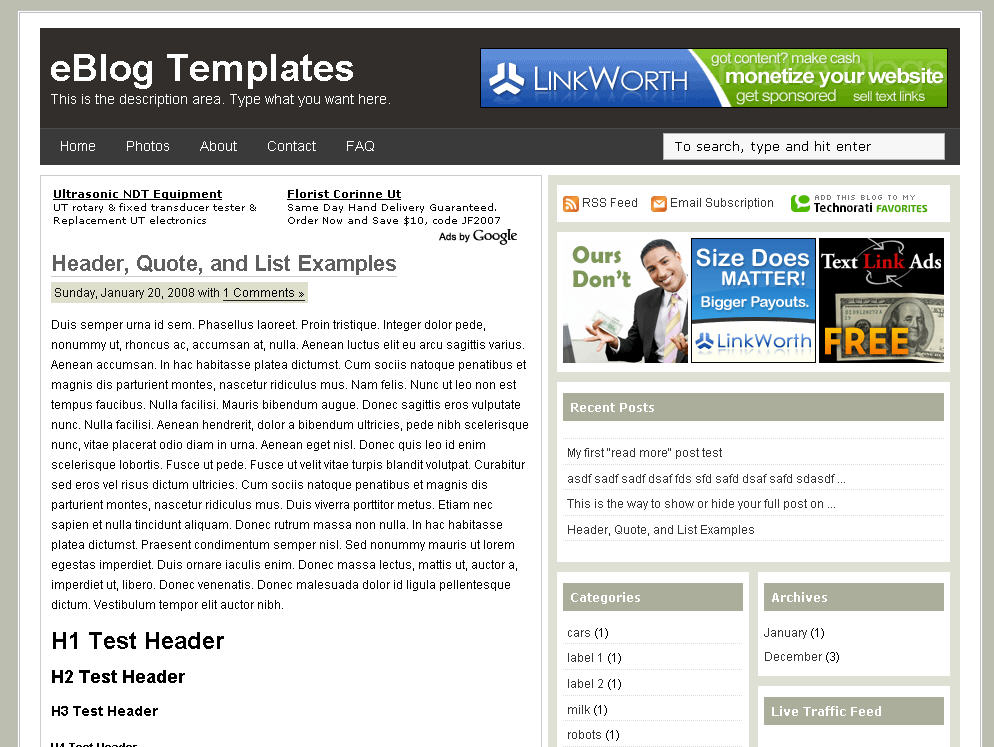
    Ads Theme Blogger Template | eBlog Templates

    Click to enlarge Ads Theme Blogger template
    If you’re looking for a new Blogger template, you came at the right time. Hands down, this is the best template we’ve converted here at eBlog Templates. It’s a wonderful web 2.0 popular blog layout with some great built in ad spots (hence the template name) and features.
    It’s either a two or 3 column template (you can change it on the fly) so you get the best of both worlds. This Blogger template is what I call a “powerhouse” template since almost all the features you need are already built in. On top of that, it’s quite easy to setup and makes your blog look like a professional site without much effort.
    I predict this template will be a top template on this site within a few months, if not weeks. With the amount of effort that went into converting this template and attention to details, I sure hope you appreciate this free amazing new xml Blogger/Blogspot template.

    Features Include

    • Two or Three right side columns which are easy to switch (default is three)
    • Three great location ad spots (header banner 468 x 60, three 125 x 125 buttons in sidebar, and a 468 x 60 AdSense banner above the first post)
    • Integrated Feedburner rss and subscribe via email sidebar module (also includes “add to favorites” Technorati link)
    • Built-in live traffic feed widget from FEEDJIT
    • Built-in MyBlogLog and BlogCatalog recent reader widgets
    • Dynamic tabs easily created by editing the link list widget
    • Search box without the need for a “go” button
    • Recent posts and comments widgets
    • Nicely designed individual blog post comments section
    • Properly setup Blogger layout editor
    You can see from this screenshot that the actual editor is nicely setup so you don’t need to scroll or try and figure out how to click on the “edit” widget links. Most templates that you download make it tough to edit — not this one!

    ads-theme-layout.jpg
    This template does require some configuration in order to get it working as designed. Please follow the steps below if you’d like it to work properly. I also recommend backing up your existing template before changing just in case you run into any problems. You could also setup a new Blogger blog as a test area and try installing it there first.

    Top Tabs Setup

    When you first install this template the top tabs will not be visible which is normal. You’ll need to go into the Blogger page element layout editor and edit the “Top Tabs” widget. It’s a link list so just add whatever tabs you want. Don’t add a “Home” tab since it will automatically appear once you create and save the tab widget.

    Header Ad Banner

    The default banner is hardcoded into the template but will disappear when you add anything to this widget. It’s an HTML widget so you can put the banner ad code straight into this box. This widget can also be deleted if you don’t have a 468 x 60 and you’ll just be left with the black header. Here’s the default ad code if you want to use it as a model:
    <a href="http://www.linkworth.com?a=10230" target="_blank">
    <img src="http://www.linkworth.com/adm/affiliate_manager/affiliate_banners/bann-36.gif" border="0" />
    </a>

    FeedBurner RSS and Email Links

    To get this section working you’ll first need to have a FeedBurner account. If you don’t already have one, please read the “How to Setup FeedBurner on Blogger” article and then come back. Another option is to just delete this widget if you’re not interested in knowing your subscriber count or allowing your readers an easy way to subscribe.
    Once you’ve got your FeedBurner account, you’ll need to edit this template code and replace a few parts. Search your template code for the following line <!-- Replace Your RSS, RSS Email Subscription, and Technorati --> and then look right below that for the rss feed link.
    http://feeds.feedburner.com/<strong>YOUR-FEED-NAME-HERE</strong> . Replace the text in red with your FeedBurner name (i.e. eBlogTemplates is ours)
    Next we’ll need to update the subscribe via email link with your feed id. You’ll need to make sure to enable subscribe via email within FeedBurner otherwise this part won’t work.
    http://www.feedburner.com/fb/a/emailverifySubmit?feedId=YOUR-FEED-ID-HERE&loc=en_US
    After you’ve changed both of these areas save your template and check to see if it works. If you’re having trouble finding your feed name or id, please read our article above or see FeedBurner’s help section to locate it.

    125 x 125 Ad Section

    These are the three ads in the right sidebar which you need to edit the template code to change. Search the template code for <!– Replace with your 125 x 125 ads –> and then look right below that for the three lines of ad code which are:
    <a href="http://www.widgetbucks.com/home.page?referrer=7116002"><img src="http://i254.photobucket.com/albums/hh92/eblogtemplates/adstheme/banner-widgetbucks.gif" border="0px" /></a>
    
    <a href="http://www.linkworth.com/?a=10230"><img src="http://i254.photobucket.com/albums/hh92/eblogtemplates/adstheme/banner-linkworth2.gif" border="0px" /></a>
    
    <a href="http://www.text-link-ads.com/?ref=2164"><img src="http://i254.photobucket.com/albums/hh92/eblogtemplates/ads/text_link_ads_F_125x125.gif" border="0px" /></a>
    If you’ve got ads to place in here, then just paste the code into the template. I recommend signing up for your own Text Link Ads account and using them. Each referral you convert, you get $20 (or $25 I forget). If you don’t have ads to use, you can either leave our default ads or delete this widget altogether.

    Recent Posts and Comments Widgets

    This one is easy to setup since we’ve already written an entire article dedicated to this. Please see “How to Setup Recent Comments and Posts Widgets” to configure these two widgets.

    Recent Readers Widget

    You’ll need to have MyBlogLog and BlogCatalog accounts if you want to use this widget. The default widget will show the original author’s pictures so please either delete this widget or change the account ids to your own. Once you’ve setup these up, then edit the template code and search for <!-- Replace "2007112507294841" with your your mybloglog id --> and then replace the account numbers with yours.

    Live Traffic Feed Widget

    This is a really cool feature within this template and the best part is you don’t need to do anything to setup it up! There are some further options if you click on “options >>” on your actual blog page under the widget but that’s it.
    You should now have the template all setup and ready to go. I hope you enjoy this beauty and please make sure to keep the footer links intact since numerous hours of my time and the original designer were put into making it. That’s all we ask for giving away this template! Enjoy!
    Special thanks to Eric over at Blogging Secret for designing this wonderful template originally for WordPress.

    Revision History

    Update (3/3/08) - Per a couple requests and to make this template even more flexible, I’ve changed how underlined links are handled. You can now edit the underlined color via the Blogger “Fonts and Colors” section along with 10+ additional other color variables. Less work for you having to mess with the .css template code now.
    Update (3/5/08) – Added in post author tags so you can toggle the “By Author Name” within the posts. Also compressed the css so the file is much slimmer and cleaner.
    Update (3/14/08) – The individual posts Google AdSense code block was missing and has now been added to the template code.
    Update (4/18/08) - Fixed layout screen so the two widgets aren’t overlapping.
    Ready to super charge your blog? Check out our professional premium blogger templates or make money by joining our blog affiliate program!
    Want to make your blog stand out from the crowd? I recommend giving your newly downloaded Blogger template a unique and personalized look. Read our Free Blogger Header Images article and find yourself a great custom header image!
    If you like this post then please consider subscribing to our eBlog Templates RSS feed. You can also subscribe by email and have new templates and articles sent directly to your inbox.
     

    Blogger Template Info
     
    Top